Google Ads is a digital advertising solution that helps you reach this audience and transform them into valuable customers.
Google
Google ads offer a variety of products making advertising in Google Search engine easier. It aims to allow your business to broader your audience and convert them into customers for your business.
How to create a successful Google Ad campaign
To create a successful advertising campaign each business should consolidate it with the business goals and objective first.
Then, they can create a relevant Google Ads campaign. By relevant ad, we mean an ad that will reach the ideal audience, an audience who is likely to become pay customers. This can be achieved by using keywords or location, for example.
Google Ads allows advertisers to measure the results and reassess if needed to assure the success of the campaign.
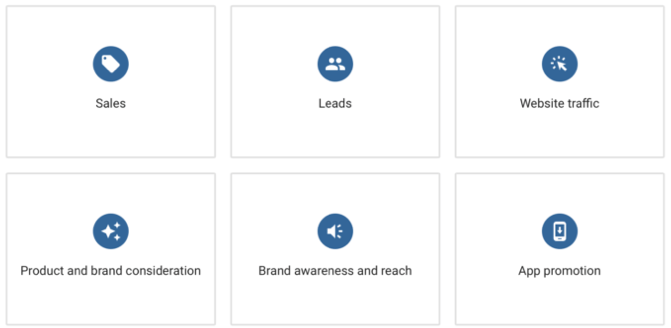
Google Ads campaign can help businesses with:
- Driving sales
Whether it is online or in-person, or over the phone, or email the campaign can be designed accordingly.
2. Getting leads
Converting the audience into paying customers by various call-to-action tools.
3. Increase in website traffic
Getting the right people to visit your website by narrowing your target audience.
4. Influence consideration
Showing off your business products and encouraging further website exploring.
5. Building awareness
Maximize exposure by brooding your audience.
6. Promoting an app
Increasing interactions with your business app.
What type of advertising campaign is right for your business
There are different types of Google campaign ads, which can support each of your business objectives.
Search Campaigns
Those appear next to Google search results and on Google partner sites, like Youtube. Use it to make potential customers notice you when looking for businesses like yours. Also, to encourage them to take action, like viewing your product list.
Display Campaigns
Those appear across all network on sites and apps relevant to your content. Display campaign can reach up to 90% of internet users with specific interests.
Video Campaigns
Those appear on Youtube and allow the advertiser to capture the attention of the audience and engage by bringing your business story to life. You only pay when your ad is clicked on.
Shopping Campaigns
Those appear on Google Shopping next to search results. Shopping ads give customers detail information about our products.
App Campaigns
Those run across Search, Play, Youtube and other apps. They are automatically adjusted and optimized to advertise you to most customers. Use to increase app engagement.
Specialized Campaigns
- Local, to drive your in-store sales
- Hotel – to advertise rates and availability
- Discovery – to engage across popular properties
Google Ads allows for additional optimization of your campaigns by narrowing your audience or budget settings.
Those are:
- Device targeting
Is depending on the device that your target audience is using the most like mobile, tablet, desktop.
- Location and language targeting
Is depending on the location and language that your target audience is using.
- Bidding and budget setting
Bid strategy, pay-per-click, the daily budget set up accordingly to your needs.
- Ad extensions
Additional links to pages of your business phone number.
Google Display Ads
What are the benefits of Google Display Ads
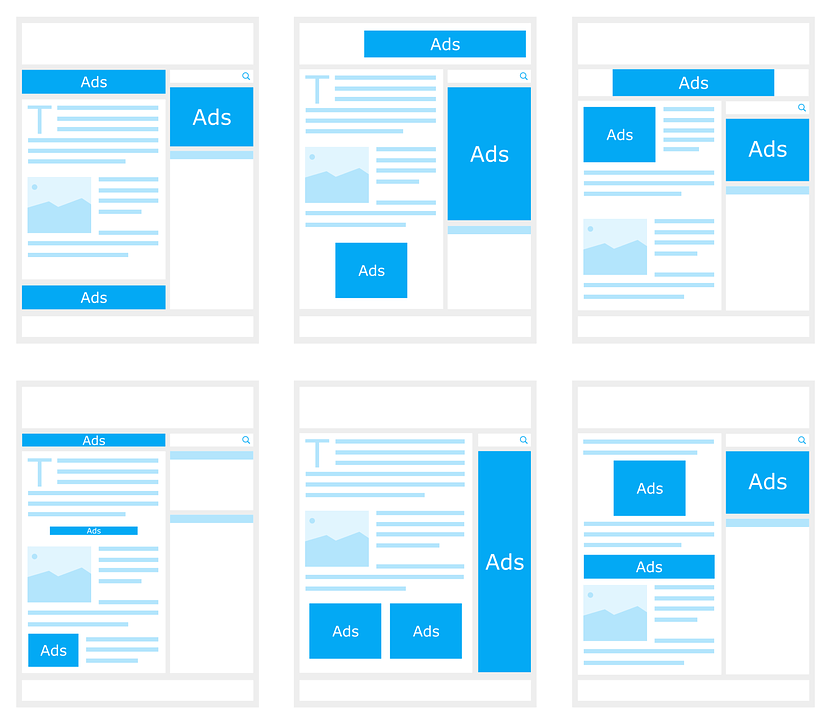
With Google Display ads as your advertising ally, you can reach over 90% of global internet users across more than three million apps and websites.
Google
Thanks to the display ads, you can get valuable insides into customer behaviour helping your business to engage with your audience better.
Google can place your ad against the most relevant content driving the best results.
You can run your ads across millions of websites, giving you enormous exposure.
The performance of your ad is tracked, and measured for the best results.
Google can provide you with features relevant to your campaign objectives and goals.
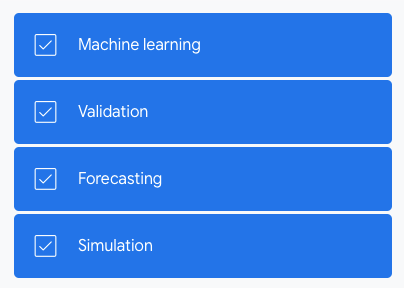
Intent signals and machine learning
Google uses intent signals and machine learning in the display ads enabling you to achieve success at a bigger scale.
Tweet
Those include:
- a deep analyzis of user activity;
- automation, bidding and targeting at the best time;
- a real-time view of user behaviour.
Google Display Ads types
Smart Display campaign
Smart Display campaign is simple, gives you a lot of insights and its run on a large scale.
Smart Display campaign characteristics:
- uses full automation: automate bidding, automate targeting, automate creativities;
- uses machine learning to optimize and build custom ads;
- uses the new auto-targeting infrastructure across the entire mid- and lower-funnel;
- you provide: content, images, budges, CPA;
- you need to have gotten at least 50 conversions on Display — or at least 100 conversions on Search — in the last 30 days.
Who is Smart Display campaign for?
- Businesses focused on performance and low commitment, who want to reach new potential customers and more engagement.
- Businesses, which want to run a dynamic remarking and extern mid-funnel to reach new users.
- Businesses that are looking for additional conversions, deliver better performance and reach than existing mid-funnel campaigns in less time.
Standard Display campaign
Standard Display campaign gives you full control over all campaign aspects by manual targeting, bidding and ad formats.
Standard Display campaign characteristics:
- builds brand awareness
- encourage your product list exploration
- motivates people to action (buy)
- automatically adjust your CPC’s, CPA’s and ROAS
- maximizes conversions
- gives you control over the ad format and responsiveness
Display targeting
Display Ads are designed to find you the right audience, at the right time and place. What helps to increase conversions into paying customers.
What option to choose to achieve your marketing goal with Display Targeting?
Build awareness
With display ads, you can broader your audience to maximize the exposure. Simply select “build awareness” as your campaign objective.
Influence consideration
Select “influence consideration” as your campaign objective, when you want to reach an audience that is actively searching for products and services.
- In-Market audiences
You can reach those potential customers while they are browsing and comparing products and connect with those the most interested in what you offer, based on their demonstrated in-market behaviour.
- Custom Intent audiences
You can create a tailored audience, not covered in one of your in-market segment. Define and reach people that intend to purchase in a real-time, by entering a keyword or URL that represents your audience.
- Similar audiences
Similar audiences function finds users, similar to your original remarking list or other uploaded compatible list and finds relevant profiles based on their recent browsing history and interests.
Drive Action
Choose this option to re-engage with the audience already intreated in your brand.
- Remarketing
Displaying your ad to people who demonstrated interest by visiting your website or app. Reconnect with them while they are browsing other websites.
- Standard remarketing
Communicate with people who previously visited your key pages via the right message, like a promotional coupon
- Dynamic remarketing
Attract people with ads of products and services that they viewed on your website. Create a display from a pre-uploaded feed, with low effort and great results.
Automated bidding

The bid strategy influences the performance and visibility of your ads. It is, therefore, critical for the success of your campaign.
Setting an appropriate bid will determine the number of interactions and conversions coming from it.
Tweet
Automated bidding will allow you to reach your bidding target at the auctions. By taking into consideration many factors of customer behaviour, like location, time, device, etc. for every auction, the automated bidding is much more effective than a manual one.
By using automated bidding you will reach the right customers at the right time.
Automated bidding uses:
- Machine learning
To help you set an appropriate bid for every auction.
- The intent
To save you time by cross-referencing data with context.
- Auction-time bids
An algorithms, tailoring bids to each user based on the conversion opportunity.
- Signals and cross analysis
To evaluate the user intent, by recognizing and adjusting for each interaction.
How to choose the right bidding strategy?
The bidding strategy should reflect your marketing goals. Whatever strategy you choose will depend on which networks you want to target and what your main focus is (conversions, clicks, etc.)
Awareness-based
- Choose this strategy if your goal is – VISIBILITY and raising a brand awareness
- Target impression share will make sure you are meeting impression share thresholds on the search results page (top, absolute, etc.)
- Ideal for raising brand awareness
Consideration-focused
- Choose this strategy if your goal is – CLICKS
- Maximize clicks, will get you as many clicks as possible within the established by your budget
- Ideal for: budget-constrained campaigns, upper-funnel keywords with high assist value in conversion
Conversion-focused
- Choose this strategy if your goal is – CONVERSIONS
- Maximize conversions, will get you as many conversions as possible within the established by your budget. No need for specific CPC, CPA or ROAS, those are automated
- Ideal for: fixed budget and no explicit CPA/ROAS goal, Target cost-per-acquisition (tCPA) without considering order value, Enhanced cost-per-click (eCPC) for no conversion tracking system or manual bidding advertisers.
Revenue-focused
- Choose this strategy if your goal is – REVENUE
- Target return on ad spend (Target ROAS), will get you as many conversions as possible at the ROAS you set
- Ideal for: automatically optimized bids for maximal revenue for set ROAS
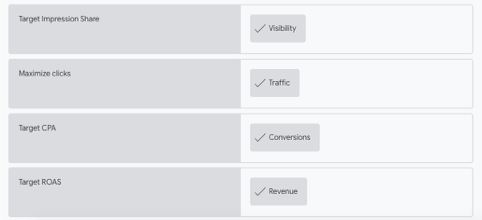
Enhanced CPC, Target CPA, Maximize Conversions, and Target ROAS fall specifically under the umbrella of Google Ads Smart Bidding. Check out the Finding success with Smart Bidding: Google Best Practices (Search) and the Smart Bidding Guide (Display) to learn more.
Display ad formats
Display ad format allow marketers for better creative control and greater efficiency.
There are following ad formats that you can choose from:
Responsive display ads
- the default format of the display;
- asset-based digital advertising;
- build inside or outside of Google Ads;
- you upload your assets (videos, images, etc.);
- creating ads in all formats;
- build for performance, reach and scale;
- automation allowing to reduce overhead for managing ad portfolios;
- machine learning and creative testing to deliver the right message to the right user.
Uploaded ads
- greater control over the look of your ad;
- build outside of Google Ads;
- categorized into: image ads with complete creative control, but only run in banner-eligible slots;
- AMPHTML ads, fast and secure, lighter load and positive user experience.
Increase conversions with Google Ads Performance Planner
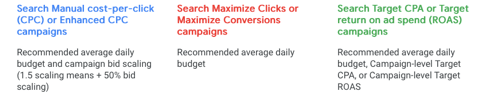
Google Ads Performance Planner is a forecasting tool helping you to determine what budget you will need to achieve your marketing goals.
It uses machine learning and account history to reveal all the possibilities for your campaign, helping you to establish you monthly, quarterly or yearly budget, which will give you the best return on your investment.
It highlights the growth opportunities and helps you discover the best bids and budget for any spend scenario.
How can Performance Planner help you to achieve the highest conversions rate
- by predicting the optimal bids and daily budget;
- by creating a future spend scenarios;
- by reallocating spend between campaigns through adjusting bids and budget.
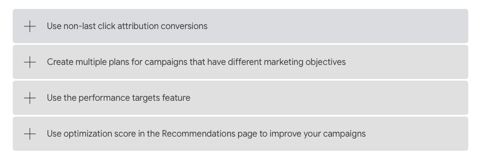
How to use Performance Planner efficiently
1. Separate plan for each marketing objective
- different campaigns have different objectives;
- the same plan will not work for all.
2. Non-last click conversions
- set bids and budgets using non-last click conversions;
- it will drive the most conversions.
3. Check and re-asses
- regularly check your plan;
- forecasts are most accurate when run closer to the actual date;
- repeat your budget planning process monthly.
To learn more about engaging and connecting with the customer read Digital Branding and Brand Engagement – Customer Behaviour and Digital Branding and Brand Engagement – Content Marketing.
To learn more about the digital brand expansion make sure to read: Digital Branding and Brand Engagement – Owned Media Marketing, Social Media Marketing Strategy For Businesses. Expand Your Online Reach and How the Search Engines can help your business? SEO Plan and successful SEM campaigns.
Thank you for Reading!
Ola van Zyl
Did you enjoy reading this post? Feel free to like and share.
Thank you!
 Online Marketing Solutions